Bring your spending in.
Import a supported CSV or Excel statement, or enter a transaction yourself.
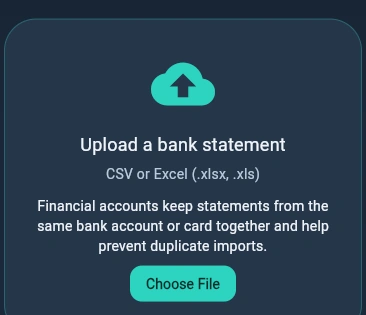 Statement import ↗

Import your bank statements, understand your spending, and build a budget that fits your life.
Coming into focus. Join the launch waitlist for updates.
Less financial noise.
More room to breathe.
THE BIG PICTURE, WITHOUT THE GUESSWORK
From the little purchases to the bigger plans, bring your financial month into one clear view.
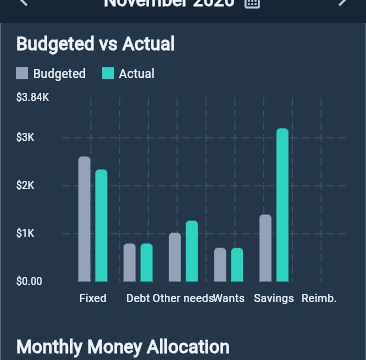
Income, spending, savings contributions and tracked debt payments, side by side. Compare your plan with your actual month and spot the categories that need a little attention.
A genuine close-up from the running application.
Give your income a purpose across everyday needs, wants, savings and debt. Set amounts that work for you, then see what is still available to budget.

Bring balances, interest rates and minimum payments into one plan. Explore avalanche, snowball and hybrid strategies, and see how an extra payment could change your forecast.
Forecasts are estimates, not guarantees.
See debt planning
A SIMPLE MONTHLY RHYTHM
Start with what you have. Build clarity, one step at a time.
Import a supported CSV or Excel statement, or enter a transaction yourself.
Statement import ↗Review categories, correct suggestions and save merchant rules for your next import.
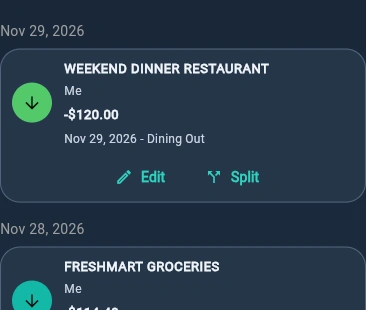 Transaction review ↗
Set monthly amounts for needs, wants, savings and debt, with room to adjust.
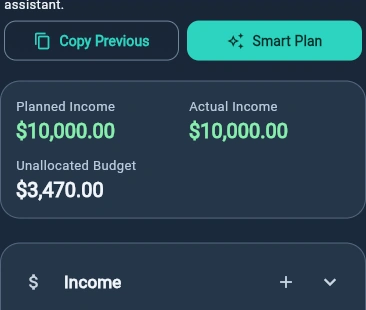 Monthly planning ↗
Compare your budget with actual spending and explore your next debt payment.
 Progress at a glance ↗
THE DETAILS THAT MAKE IT YOURS
Find transactions by category, review statement imports before saving, and keep your own merchant rules.
Switch between personal and household management. Attribute transactions and plans to Me, Partner or Joint within your account.
Pick a light or dark theme, customize category colors, and add categories that reflect how you spend.
TAKE A CLOSER LOOK
Genuine captures from Budgetlyra. All numbers and accounts are synthetic demo data.
Select a screen to enlarge it. Use the arrow keys to browse in the viewer.
CLARITY, ON A SMALLER SCREEN
Made for a quick check-in, wherever life takes you. These are actual mobile layouts, captured at 390 × 844.
Mobile browser previews. Store availability will be announced at launch.
A LITTLE TRANSPARENCY
Budgetlyra is approaching launch. Here is what is available in the app today, and what is still taking shape.
THE EVERYDAY ESSENTIALS
A clearer start.
Build the habit of understanding your money.
Implemented in the current app. Launch access and any permanent free tier are still to be confirmed.
Get launch updatesLOOKING AHEAD
To be confirmed
Monthly pricing to be confirmed
AI recognition is currently a mock-only prototype. Production billing, currency and trial terms are unconfirmed.
Keep me in the loopNo checkout is offered here. Joining early access does not start a trial or subscription.
CONFIDENCE STARTS WITH CLARITY
The current app uses statement uploads and manual entry. You do not need to provide a bank login to import a file.
Check imported transactions and categories before committing them. Standard recognition and saved rules do not depend on the AI prototype.
The web app uses an authenticated server for account data. Live AI services and automatic bank synchronization are not offered.
The screenshots on this website contain synthetic data only. Public account access, privacy and service terms will be confirmed before launch.
A FEW THINGS YOU MIGHT BE WONDERING
Import a statement or add transactions manually, review the categories, set a monthly budget and compare your plan with actual spending. Debt planning helps you explore repayment strategies using your own balances, rates and payments.
The current app supports CSV and Excel (.xlsx, .xls) statements. PDF imports are not currently available. Statement layouts vary, so inspect the parsed transactions before saving.
The current implementation uses statement uploads and manual transactions. Automatic bank synchronization is not offered. No bank-login credentials are needed for a file import.
Yes. Personal and household management modes are implemented. Household records can use Me, Partner and Joint ownership within one account. Separate partner invitations and multi-user collaboration are not advertised as live.
Standard importing, merchant recognition and saved rules are implemented without an AI Premium entitlement. A permanent Free tier and the final Premium feature list have not been confirmed. Advanced AI-assisted recognition is planned; the current implementation is mock-only.
Production subscription prices, currency and trial eligibility are not confirmed. Older onboarding prices are not verified offers. The pricing section is a preview, and there is no checkout or trial to activate on this website.
A public app registration and login destination has not been confirmed for this website. Join early access for launch updates. The waitlist does not create a Budgetlyra account. Existing beta users should continue using their provided app link.
When enabled, accounts use a one-time email-verification link and a six-digit password-recovery code. Password recovery requires working email delivery. Email delivery will be confirmed before public registration.
This website demonstrates the Flutter web app in desktop and mobile browser layouts. Native platform runners are present in the repository, but public App Store and Google Play distribution have not been confirmed. Join the waitlist for release availability.
The web application sends account data and statement uploads to Budgetlyra’s authenticated server. This website contains demo screenshots and does not access financial accounts. The early-access form is hosted by Tally and has its own data handling. Launch privacy and service policies need to be finalized before public registration.
Use the early-access form for launch communications. A public support address has not yet been confirmed for this website. If you already use a beta build, use your existing beta support channel.
A CALMER RELATIONSHIP WITH MONEY
Your next chapter starts with a clearer picture.
Join early accessOpens the Tally waitlist for launch communications.
This does not create an app account. Submit only if you want these updates.